
Intl对象才是前端国际化的正确姿势
Intl 是什么?为什么前端开发都应该了解它?
Intl构成了 ECMAScript 国际化 API,该 API 提供了语言敏感的字符串比较、数字格式化、日期和时间格式化等功能。Intl 对象本身包含了多个构造函数,专门用于不同场景的国际化:
- •
Intl.DateTimeFormat: 日期和时间格式化 - •
Intl.NumberFormat:数字(包括货币、百分比)格式化 - •
Intl.RelativeTimeFormat:相对时间格式化(如“3天前”) - •
Intl.ListFormat:列表格式化(如“A、B和C”) - •
Intl.PluralRules:复数规则 - •
Intl.DisplayNames:语言、地区、脚本的显示名称
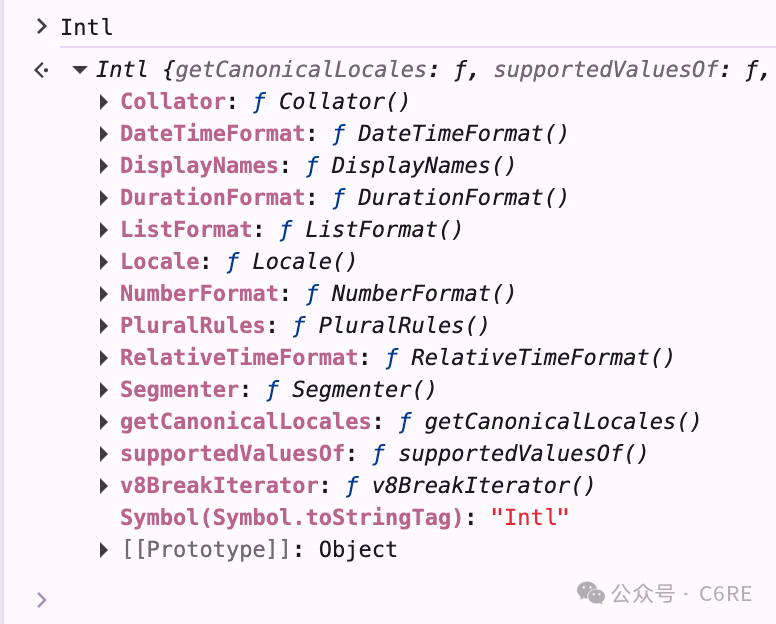
在控制台输入Intl,会打印这些信息:
1、DateTimeFormat – 日期、时间格式化
使用示范
const date = new Date() // 当时时间是2026/2/27 16:28:07
const formatter = new Intl.DateTimeFormat("zh-CN", {
	dateStyle: "medium", // 可选:full, long, medium, short
	timeStyle: "short", // 同样可选
	hour12: false, // 是否使用12小时制
})
console.log(formatter.format(date)) // 显示 2026年2月27日 16:28:07
dateStyle 和 timeStyle 是预设样式,还可以用定制化更高的方式
高定制化使用
new Intl.DateTimeFormat("zh-CN", {
	year: "numeric",
	month: "2-digit",
	day: "2-digit",
	hour: "2-digit",
	minute: "2-digit",
	second: "2-digit",
	hour12: false,
}).format(new Date())
可以输出 '2026/02/27 16:38:36',注意 dateStyle 和 timeStyle 不能与高定制化配置的方式混用,不然浏览器会报错
2、Intl.NumberFormat – 数字、货币、百分比格式化
前端经常遇到数字格式化的需求:金额、百分比、千位分隔符。
❌ 错误示范:
const price = 1234567.89
// 正则替换
console.log(price.toFixed(2).replace(/\B(?=(\d{3})+(?!\d))/g, ","))
输出 1,234,567.89, 这在德国人眼里是错误的显示方式,他们用 1.234.567,89 这种格式
✅ Intl 正确姿势:
const price = 1234567.89

// 中国习惯
new Intl.NumberFormat("zh-CN").format(price) // 输出 '1,234,567.89'

// 德国习惯
new Intl.NumberFormat("de-DE").format(price) // 输出 '1.234.567,89'

// 印度习惯
new Intl.NumberFormat("en-IN").format(price) // 输出 '12,34,567.89'
货币格式
const price = 1234567.89

// 美国习惯
new Intl.NumberFormat("en-US", {
	style: "currency",
	currency: "USD",
}).format(price)
// 输出 '$1,234,567.89'

// 中国习惯
new Intl.NumberFormat("zh-CN", {
	style: "currency",
	currency: "USD",
}).format(price)
// 输出 "¥1,234,567.89"
百分比和小数格式
const num = 0.123

new Intl.NumberFormat("zh-CN", {
	style: "percent", // percent是百分比显示
	minimumIntegerDigits: 2, // 最小整数位数,默认1
	minimumFractionDigits: 2, // 最小小数位数
	maximumFractionDigits: 2, // 最大小数位数
	// minimumSignificantDigits: 2, // 最小有效位数
	// maximumSignificantDigits: 2, // 最大有效位数
}).format(0.231)

// 输出 `'23.10%'`
当同时定义了有效位数和小数位数会怎么样呢?
根据规范,会把数字格式化选项分为两个互斥的组:
- • 组A(数字位数): minimumIntegerDigits、minimumFractionDigits、maximumFractionDigits
- • 组B(有效数位数):minimumSignificantDigits、maximumSignificantDigits
如果定义了组B中的任何一个属性,组A就会被完全忽略。你可以用 roundingPriority 选项,来更精细地控制冲突时的行为,现已被广泛支持。
3、RelativeTimeFormat – 相对时间格式化
const rtf = new Intl.RelativeTimeFormat("zh-CN", {
	numeric: "auto", // 自动选择“昨天”还是“1天前”
	style: "long", // 长格式
})

rtf.format(-1, "day") // 输出:'昨天'
rtf.format(-3, "day") // 输出:'3天前'
rtf.format(2, "day") // 输出:'后天'
rtf.format(-200, "hour") // 输出:'200小时前'
const rtf = new Intl.RelativeTimeFormat("en-US", {
numeric: "auto", // 自动选择“昨天”还是“1天前”
style: "long", // 长格式
})
rtf.format(-1, "day") // 输出:'yesterday'
rtf.format(1, "day") // 输出:'tomorrow'
rtf.format(2, "day") // 输出:'in 2 days'
rtf.format(-200, "hour") // 输出:'200 minutes ago'不过对于复合单位的输出,比如”3天2小时前“这种格式,通过它没办法直接得到,需要自己动手实现。
建议:除非产品明确要求“3天2小时前”这种格式,否则推荐只用最大的单位。因为这是大多数用户习惯的阅读方式,也是主流产品的做法。
4、Intl.ListFormat – 列表格式化
const list = ["A", "B", "C"]
const lf = new Intl.ListFormat("en-US", {
	style: "long", // 可选:long, short, narrow
	type: "conjunction", // conjunction是连接词(and),disjunction 是连接词(or)
})
lf.format(list) // 输出:'A, B, and C'
const list = ["A", "B", "C"]
const lf = new Intl.ListFormat("zh-CN", {
style: "long", // 可选:long, short, narrow
type: "conjunction", // conjunction是连接词(and),disjunction 是连接词(or)
})
lf.format(list) // 输出:'A、B和C'5、Intl.PluralRules – 复数规则
const prUs = new Intl.PluralRules("en-US")

function getAppleCountMessage(count) {
	const pluralRule = prUs.select(count)
	const messages = {
		one: `There is ${count} apple.`,
		other: `There are ${count} apples.`,
	}
	return messages[pluralRule] || messages.other
}

getAppleCountMessage(1) // 输出:"There is 1 apple."
getAppleCountMessage(3) // 输出:"There are 3 apples."

// 不同语言的复数规则不同
const frPr = new Intl.PluralRules("fr-FR")
console.log(frPr.select(1)) // "one"  (法语1是名词单数)
console.log(frPr.select(2)) // "other"  (法语2是名词复数)
对于中文,这个API显然没有什么作用
6、Intl.DisplayNames – 语言、地区、脚本的显示名称
对于多语言的网站,你显示需要这个API。
const languageName = new Intl.DisplayNames(["zh-CN"], {
	type: "language",
})

languageName.of("en") // 输出:'英语'
languageName.of("zh") // 输出:'中文'
languageName.of("ja") // 输出:'日语'
const regionName = new Intl.DisplayNames(["zh-CN"], {
type: "region",
})
regionName.of("CN") // 输出:'中国'
regionName.of("JP") // 输出:'日本'
regionName.of("US") // 输出:'美国'7、浏览器兼容性怎么样?
| API 名称 | 现代浏览器 (Chrome/Edge/Firefox) | Safari | 生产环境建议 |
| Intl.DateTimeFormat | ✅ 全支持 | ✅ 10.1+ | 可用 |
| Intl.NumberFormat | ✅ 全支持 | ✅ 10.1+ | 可用 |
| Intl.RelativeTimeFormat | ✅ 71 | ✅ 14+ | 可用,Safari注意 |
| Intl.ListFormat | ✅ 72 | ✅ 14.1 | 可用,Safari注意 |
| Intl.PluralRules | ✅ 63 | ✅ 13+ | 可用,Safari注意 |
| Intl.DisplayNames | ✅ 81 | ✅ 14.1 | 可用,Safari注意 |
8、总结
为什么我们要用 Intl:
- • 日期格式、数字格式、列表格式都符合当地习惯
- • 减少第三方库的使用
- • 性能更优秀
以上是 Intl 对象的核心成员